How do I organize my golf group with Tee Time Organizer?+
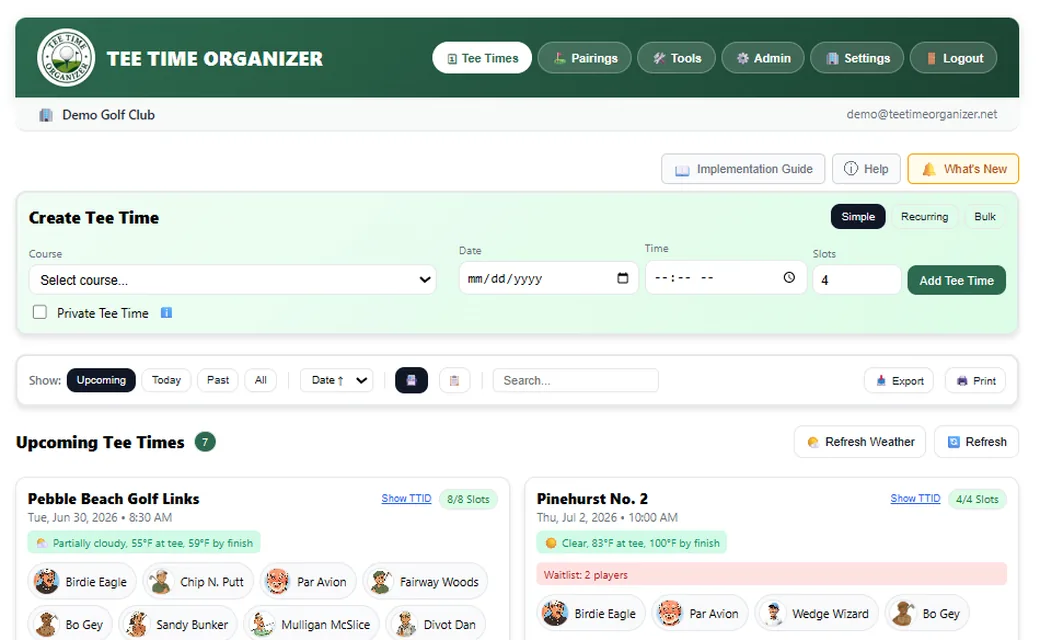
Add your courses and players during a one-time setup (about 5 minutes). Then create a tee time, choose the course, date, time, and number of slots, and publish it with one click. Your players receive an email with a personal link to RSVP. The whole process takes under 30 seconds.
Do my players need to download an app?+
No. Players access their portal through a web link — no app download, no account creation, no passwords. It works on any device with a browser. Players can optionally add it to their home screen for an app-like experience.
How do golf pairings and balanced flights work?+
Tee Time Organizer generates pairings based on course handicaps. Choose balanced flights (A/B/C/D tiers evenly distributed across groups), randomized pairings, or manually arrange players. You can also set up shotgun starts with starting hole assignments. Print or email the tee sheet to your pro shop.
Can I track handicaps for my golf group?+
Yes. Enter each player's GHIN handicap index, and Tee Time Organizer automatically calculates course handicaps using the official WHS formula based on the course rating, slope, and par of the tees being played.
How do the automated reminders work?+
Organizers set their own reminder schedule. You can enable a day-before reminder, a same-day reminder, and an optional custom reminder (any number of days ahead), and choose exactly what time of day each one goes out. Default times are 6 PM the day before and 9 AM the morning of, but you can change either to whatever works for your group. All reminders include the course, time, weather forecast, and a link to the player's portal. Reminders are sent via email and SMS based on each player's communication preferences. Configure in Settings → Notifications.
Is Tee Time Organizer good for golf leagues?+
It's built for exactly this. Whether you run a weekly men's or women's golf league, a senior group, or a corporate outing series, you get a player database, automated scheduling, RSVP tracking, pairings, handicap management, and automated communications — all in one platform.
How much does it cost?+
Free for up to 8 players, no credit card required. Paid plans start at $4.99/month (Starter, 20 players), with Plus ($9.99, 40 players), Professional ($14.99, 100 players), and League ($24.99, 250 players). Annual billing saves up to 20%. Need more than 250 players? Contact us about our Club tier. Player counts are your regular players. Occasional guests are always free; a guest who plays often enough to be a regular in practice counts like one. Games (skins, Nassau, Sixes, Stableford and more) come with Plus and above.
What's included in the free plan?+
The free plan supports up to 8 regular players (occasional guests are always free) and includes unlimited tee times, a searchable database of thousands of golf courses, one-click player RSVP, tee sheet pairings, auto-promoting waitlists, email messaging to players, and weather forecasts on every tee time. No credit card is required to sign up, and there is no time limit on the free tier.
Can I cancel my subscription anytime?+
Yes. You can cancel your paid plan at any time from Settings. There are no long-term contracts, no cancellation fees, and no questions asked. If you cancel mid-billing-cycle, you keep access through the end of the period you already paid for, then automatically move to the free tier (which keeps your data intact for up to 8 players).
How does Tee Time Organizer compare to spreadsheets or group texts?+
Spreadsheets and group texts require the organizer to manually chase RSVPs, copy player info between locations, calculate handicaps by hand, and send reminders one at a time. Tee Time Organizer automates all of that: players RSVP in one click, the system auto-promotes the waitlist when spots open, handicaps update automatically via GHIN, and reminders send themselves with weather forecasts. Most organizers save 2-4 hours per week of coordination work, and players stop missing tee times because of buried text messages.
Does it work for women's golf leagues, senior groups, and mixed groups?+
Yes. Tee Time Organizer is designed for any kind of recurring golf group, including women's leagues, men's leagues, senior groups, mixed groups, junior programs, and corporate outings. You can configure different tees per player (for handicap calculations), set up flexible pairings (foursomes, threesomes, twosomes, A/B/C/D balanced flights), and customize messaging templates for your specific group.